


United Airlines
4.742.83K Reviews
App Specs
- Version
- 4.2.86
- Updated On
- License
- Free
- Downloads
- 10,000,000+
- Developer
- United Airlines
- Categories
- Travel & Local
- Platform
- Android, iOS
Screenshots


 Analysis by AppCompare
When I’m choosing a travel app, I want it to help with the practical parts of a trip, not just get me to a booking screen. United Airlines is most useful when United is already part of my plans: it brings flight management, travel updates, and account details into one place. I’d treat it as a companion to flying with the airline rather than a complete replacement for broader trip-planning tools.
Who gets the most from it
I’d recommend it first to people who fly United often, especially anyone who wants to check a reservation and MileagePlus activity without juggling separate tools. It can also be handy for an occasional passenger who prefers keeping the airline’s trip information close at hand. If you mainly compare many airlines or plan a complicated itinerary across different carriers, though, a general travel search or itinerary app may suit you better for the early planning stages.
A useful way to decide is to ask what you need after choosing a flight. If you want to handle airline-specific details, check alerts, or review your rewards, this app has a clear purpose. If you only need a broad comparison of routes and fares, the airline’s own app is naturally narrower than a travel marketplace. I’d use the broader service to explore options and then turn to United’s app for the parts tied to a United booking.
A more practical trip workflow
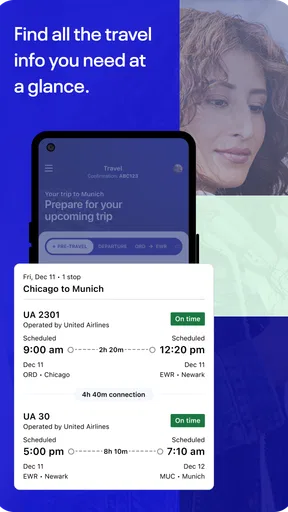
Here’s an everyday situation where I can see the app earning its place: I book a United flight, check my seat and baggage plans before leaving home, then keep the app available while travelling to the airport. If a schedule or gate update arrives, I can look for it there instead of repeatedly searching through messages or trying to read a crowded departure board from a distance. That doesn’t remove the need to listen for airport announcements, but it gives me another convenient place to check.
I’d also open the reservation before travel rather than waiting until I reach the airport. That gives me time to review the details and address any available changes while I’m not rushing. If I’m travelling with someone else, I’d make sure each person knows which booking details and alerts they need to monitor; one passenger’s phone is not a substitute for everyone in a group staying informed.
One small but worthwhile habit is to check what notifications are enabled before the travel day. Alerts are most useful when they surface important trip changes, but too many notifications can become easy to ignore. I’d keep the ones that matter to my plans and still verify time-sensitive information in the app or at the airport when necessary.
What it does well, and where I’d be cautious
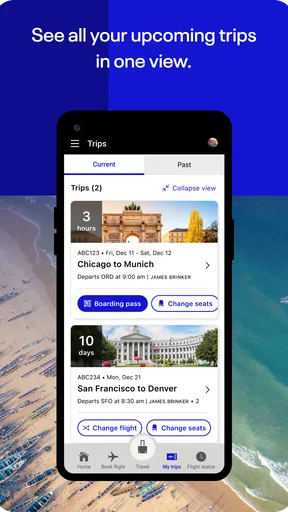
The main advantage over relying only on email or a mobile browser is having airline tasks gathered in a dedicated place. That can make it easier to find a reservation, manage a flight, and check MileagePlus without searching through old correspondence. Compared with a broad travel app, the trade-off is focus: United’s app is more relevant to United travel, while a multi-airline service may be more convenient for comparing or organizing trips that involve several providers.
Worth Reading Before You Choose

EA SPORTS FC Mobile 26 Is a Bigger Football Game, but It Takes Time

Flipboard Shows What News Apps Must Do Beyond the Feed

Switching to Android Auto Means Rethinking Your Driving Routine

Google Calendar Makes a Crowded Week Easier to Manage

Ludo King Makes the Most of the Minutes Between Plans

Baby Panda World Brings Quick Play to Modern Phones, but Its Game Library Feels Busy
I wouldn’t assume that every travel issue can be solved by tapping around in an app. A digital interface is convenient for routine tasks, but a disrupted journey or an unusual booking question may call for direct help from the airline or airport staff. I’d keep essential booking information accessible and avoid treating push notifications as the only source of updates, particularly when a connection or tight schedule makes accuracy important.
It’s also worth thinking about how you travel. If you rarely fly United, the app may not be something you need open every week; installing it around a trip could be enough. If your travel is mainly on other airlines, their own apps may be more useful day to day. The best fit is someone who values United-specific trip handling, not someone looking for one neutral app to manage every carrier equally.
United Airlines is a free travel and local app from United Airlines, rated for everyone. It has a 4.7 average from around 907,000 ratings and has been installed over 10 million times, which suggests it has a substantial audience. Those figures can offer context, but they don’t tell me whether its particular workflow will suit your travel habits. I’d judge it by whether it makes your own United trips easier to follow and manage.
Booking and Managing Your Flights
The United Airlines app makes booking flights a breeze. You can search for flights, compare prices, and book your trip all in one go. It’s like having a travel agent right in your pocket! What’s more, the app allows you to manage your flights effortlessly. Need to change your seat or add a bag? No problem—just a few taps and you're all set.
Real-Time Notifications
One of my favorite features is the real-time notifications. Imagine being updated about gate changes or delays without having to constantly check the boards. It’s like having your own personal assistant keeping you informed. Plus, you can customize these alerts, so you’re only getting the info that matters most to you.
In-Flight Experience
Let’s not forget the in-flight perks. The app offers access to a wide range of entertainment options, from movies to music, ensuring you’re entertained throughout your flight. And if you’re someone who likes to stay connected, Wi-Fi purchase is just a tap away. This feature is a lifesaver for those long-haul flights where you just need to check your email or catch up on work.
MileagePlus and Rewards
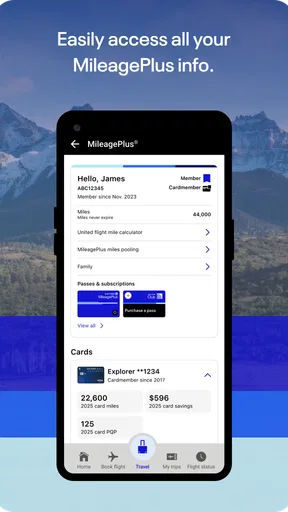
If you’re a frequent flyer, you’ll appreciate the integration with MileagePlus. You can easily track your miles, view your status, and even redeem awards directly from the app. It’s a fantastic way to keep on top of your rewards and maximize your benefits.
User-Friendly Interface
The app’s interface is clean, intuitive, and user-friendly. Even if you’re not tech-savvy, navigating through the various options is a walk in the park. Everything is clearly laid out, which makes the whole process of using the app seamless and stress-free.
Current version and what to expect
The current release is version 4.2.60, while the app itself has been available since August 23, 2011. That long-running presence tells me this is an established airline companion, but the version number alone doesn’t reveal which individual features changed or how they changed. I wouldn’t treat a newer version label as proof that every screen has been redesigned or that a particular issue has been fixed.
For an existing user, the sensible approach is to keep the app current on a compatible device and judge changes by the tasks that matter: opening a booking, finding travel updates, handling an eligible reservation, and checking MileagePlus. The minimum operating system is 10, so compatibility is one practical thing to check before relying on it for an upcoming trip. I’d also avoid waiting until the airport to sign in or explore a changed layout; a calm check at home is less stressful.
Small decisions that make it more useful
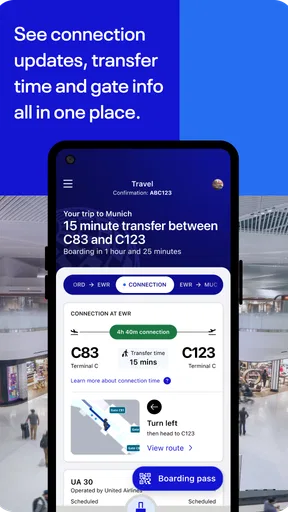
For a booking with multiple legs, I’d review each segment separately instead of assuming one update applies to the whole itinerary. A gate change or delay can affect one part of a journey without resolving what happens to a later connection, so I’d use the app to stay oriented and confirm the next step before moving through the airport. This is particularly useful when travel plans leave little spare time.
For rewards, I’d check MileagePlus before making a decision that depends on miles or status rather than relying on memory. Seeing account information in the same place as the trip can make planning easier, but it’s still worth reviewing the terms shown for the specific booking or redemption. I’d regard the app as a convenient account window, not a reason to assume every fare or reward option works the same way.
For in-flight entertainment and connectivity, I’d think ahead about what I need to do offline. The app’s entertainment and Wi-Fi options can be useful, but they don’t guarantee that every desired service will be available or suitable for every passenger and flight. If I need to work, I’d prepare important files and tasks before boarding, then treat onboard access as a convenience rather than the only plan.
Questions I’d settle before depending on it
Can I use it if I’m not a frequent flyer? Yes, its flight-management role can still be useful for a single United trip; the rewards features matter more if you actively use MileagePlus. Does it replace airport displays and announcements? I wouldn’t rely on it as a complete replacement. It provides a convenient way to check airline updates, while airport information and staff remain important sources during travel.
Is it the best app for comparing every airline? Not if broad, cross-carrier comparison is your priority. I’d use a general travel service to explore alternatives and United’s app when I want to work with a United itinerary. And should I install it long before travelling? If you fly United regularly, keeping it ready makes sense; for a one-off trip, installing it before departure and checking access at home is a more practical minimum than first opening it in a rush.
The app is free, and its current release is 4.2.60. It is published by United Airlines and sits in the travel and local category, so its strengths are tied to the airline’s own trips rather than being a neutral control centre for every travel provider. I’d keep that distinction in mind when deciding whether it deserves a permanent spot on my phone.
So, do I recommend giving the United Airlines app a whirl? Absolutely! Whether you’re a seasoned traveler or just planning a quick getaway, this app is a must-have for your smartphone. It’s packed with features that cater to all your travel needs, making your journey smoother and more enjoyable.
Next time you’re planning a trip, I suggest giving the app a download. It might just become your new travel companion, keeping you organized and entertained from takeoff to landing.
Pros
- Intuitive interface for easy booking.
- Real-time flight status updates.
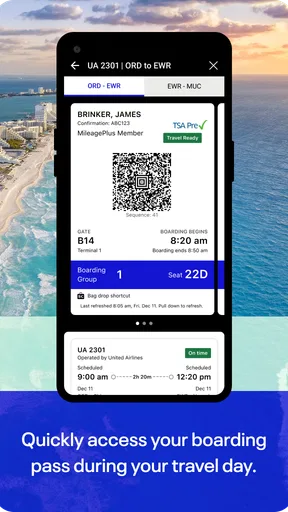
- In-app boarding passes available.
- Frequent flyer integration.
- Multiple language support.
Cons
- Limited offline functionality.
- Occasional app crashes reported.
- Some features require internet.
- Seat selection can be tricky.
- Login issues for some users.
FAQs for United Airlines
How do I book a flight using the United Airlines app?
To book a flight using the United Airlines app, start by opening the app and logging into your account. Use the 'Book' feature to enter your travel details, including departure and arrival locations, dates, and passenger information. The app will show available flights, allowing you to select your preferred option and complete the booking process securely.
Can I check in for my flight through the app?
Yes, you can check in for your flight through the United Airlines app. Check-in typically opens 24 hours before your flight's departure. Simply navigate to the 'Check-In' section, follow the prompts, and your boarding pass will be available digitally within the app, streamlining your airport experience.
What features are available for MileagePlus members on the app?
MileagePlus members have access to exclusive features on the United Airlines app, including viewing and updating their account details, checking mileage balance, and accessing special offers. Members can also use their miles to book flights directly through the app, enhancing the convenience and utility of their membership.
Does the United Airlines app support flight status updates?
Yes, the app provides real-time flight status updates. Users can track their flights by entering the flight number or route. The app sends notifications for changes in departure times, gate information, and delays, ensuring you stay informed about any updates to your travel plans.
Is the United Airlines app free to download and use?
The United Airlines app is free to download and use on both Android and iOS devices. While the app itself doesn't have any charges, some features, such as purchasing in-flight services or upgrading seats, may incur additional costs. Always check for any charges associated with specific features or services.


